


To help ensure a smooth return to school, please review this back to school checklist. This gives you time to replace missing items or fix any uniform issues before the first day.
Pre-Return Checklist
- Homework: Ensure all homework set on the DPR is complete.
- Uniform & Socks: Wash and lay out all uniform. Socks must be solid black.
- Headscarves: Must be plain dark blue, black, or grey.
- Footwear: Check that school shoes still fit. Trainers are strictly not allowed.
- Bags & Books: Clean out and repack school bags (rucksacks only). Include all 9 pieces of essential equipment, required subject books, and a reading book (from home, the school library, or your local library).
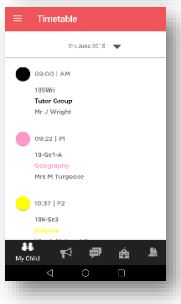
- Timetables: Check your child’s timetable on MyChildAtSchool* so they know their lessons for day one.
- Morning Routine: Set an alarm allowing plenty of time. We recommend building in an extra 15 minutes of travel buffer. Reminder: Free breakfast is available at school for early arrivals!
Uniform & Appearance Guidelines
Please pay special attention to these common return-to-school items to ensure full compliance with school policy:
- Hair: Must be a natural color. Please allow enough time before school returns to rectify any temporary dyes.
- Nails: Must be free from polish and natural (no acrylics or fake nails).
- Jewellery: No jewellery is permitted, including studs. There are no exceptions for freshly pierced ears—please ensure all jewellery is removed before arriving.
- Ties: Must be worn with all collared shirts that have a top button.
- Skirts: Must be worn at an appropriate length.
> Please Note: Students with uniform infractions will be held in isolation until the issue is rectified.
Need Help or Guidance? If you are unsure about skirt length, shoe styles, or any other uniform rules, we are happy to advise before you purchase or make changes. Please email us at office@heartlands.haringey.sch.uk. You can also view the full uniform policy HERE.
*How to View Timetables on MyChildAtSchool: Select ‘One Day to View’, tap the date at the top of the pane, and select the specific day to view your child’s schedule. Students are expected to know their daily lessons.